
What TankCoach does
In short
TankCoach is a coach for World of Tanks (Wargaming) and Mir Tankov (Lesta), free during the test period: a mod quietly records your battle, and a minute later the website shows a detailed breakdown — where each shell went and why, when and by whom you were spotted, what your connection did, how much stronger your team was and what is worth training.
How it differs from usual stats sites:
- It analyses every shot, not averages. Aim time, reticle swing, lag before the shot, the hit point on the armour in 3D.
- It shows the battle through the game client’s eyes. A map player: where you and the enemies were, who saw whom, where shots came from.
- It keeps history. “My battles” and “History” on the site: every battle, “what the battle is remembered for” tags, connection trends and training advice across many battles.
- It tells you nothing during the battle. The mod only writes files; all analysis happens after the battle, on the site. This is fair to other players and within the game rules.
Site: tankcoach.net. World of Tanks reports live on app.tankcoach.net, Mir Tankov reports on ru.tankcoach.net. Almost everything is the same for both games; differences are marked (the main one: a simplified “Team strength” on Lesta, see below).
In short: how TankCoach differs from stat sites
Stat sites — such as tomato.gg, or XVM and similar mods in game — answer “how good am I overall”: WN8 and other ratings, per-tank stats, marks of excellence, comparison with other players. Battle results are enough for that: damage, spotting, win or loss. According to its own site, the tomato.gg mod uploads the results of every battle and your garage loadouts.
TankCoach answers a different question: “what happened in this battle, and why”. The mod records the battle itself — movement, aiming, every shot, your connection second by second — and the server breaks it down shot by shot:
| Stat sites (tomato.gg etc.) | TankCoach | |
|---|---|---|
| Input | battle results | a recording of the whole battle: positions, aim, shots, hits on you, connection |
| Main question | what is my level, which tanks work for me | why I missed, why I got penned, is the game rigging this battle |
| Where the shell went | no | every shot in 3D on the map terrain, with your and the server reticle |
| Connection | no | ping, packet loss and lag spikes per second, lag right before a shot |
| Armor | no | target armor against your shell, your armor against every incoming hit |
| Ratings, leaderboards, marks | yes, their strength | no — not what we do |
Not “instead”, but “alongside”: stats show what works for you, TankCoach shows why. Comparison based on tomato.gg’s public descriptions as of 10 Nov 2026; they may have features we don’t know about.
Getting started
Setup takes a couple of minutes; no application and no game password are needed.
- Download the kit at tankcoach.net/download — one for World of Tanks, one for Mir Tankov. The archive holds the mod as a single file (
.wotmodor.mtmod) and a.batinstaller. The kit is signed: the installer checks the signature, finds the game folder, backs up the previous version and leaves other mods alone. - Play a battle. The mod records it quietly into
Netprobe_mod_resultin the game folder. - In the garage press Ctrl+Shift+R (or Mods menu → TankCoach → “Open → Build a battle”). The mod page opens with the list of recorded battles.
- Press “Build” next to a battle. The first time a consent window explains what is sent and where. After “Agree” a login is created automatically from the nickname in that battle.
- A few seconds later the report opens in the browser. It also appears in “My battles” on the site, which works from any device without the game.
Login and alt accounts. TankCoach has its own login: nickname and key. The mod sees which account you are playing and uses the matching login. “My battles” from the in-game menu opens the site already logged in. To log in from a phone you can set your own password at app.tankcoach.net/key.
What leaves your PC:
| When | What | Game |
|---|---|---|
| On “Build” | the files of one battle for analysis | both |
| At battle start | team rosters: account IDs and tanks, no nicknames — for “Team strength” | World of Tanks |
| During and after the battle | public player stats from tanki.su, no nicknames — for “Team strength” | Mir Tankov |
| On a mod error | an error report (can be turned off) | both |
| Once a day in the garage | check for a new version | both |
The game password is never needed and never requested. Details: “What data we collect” (tankcoach.net/privacy).
In the game: what the mod does
In battle the mod only records: it never shows enemies, hidden data or hints. Load on the game is about 1.5 % of frame time (measurements: tankcoach.net/nagruzka).
What it records (only what your game client already knows): movement and HP of vehicles the client saw; your reticle and the server reticle; every shot and hit, including the point and angle on the armour; spotting and visibility rays; the event feed; per-second connection; battle results. On Wargaming maps with “random events” (Himmelsdorf, Prokhorovka, Ruinberg, Old Harbor) it also records the event zones; players breaking trees and houses is not recorded.
In-battle indicators — only about your connection, each can be turned off:
- per-second connection bar (green — clean, yellow/red — packet loss);
- your shots bar;
- “lag now” square;
- ping and lag as numbers;
- your and the server reticle circles and the shell point after a shot — off by default.
Mods menu in the garage → TankCoach. Indicator checkboxes (the section switch hides everything visible at once) and the “Open” list: “My battles on the site” (browser, already logged in) or “Build a battle” (the mod page). Without the menu libraries the same checkboxes are on the mod page.
Mod page (Ctrl+Shift+R in the garage). List of recorded battles with “Build” buttons, indicator settings and a “battle found / battle in N s” bar so you do not miss the start while in the browser. Once a day the mod tells you in the garage if a new kit is out.
The analysis is built on our server — nothing is analysed on your PC.
“My battles” on the site
“My battles” lists all your analysed battles on one page, from PC or phone, without the game running. Address: app.tankcoach.net/battles (World of Tanks) and ru.tankcoach.net/battles (Mir Tankov). 50 battles per page, newest first.
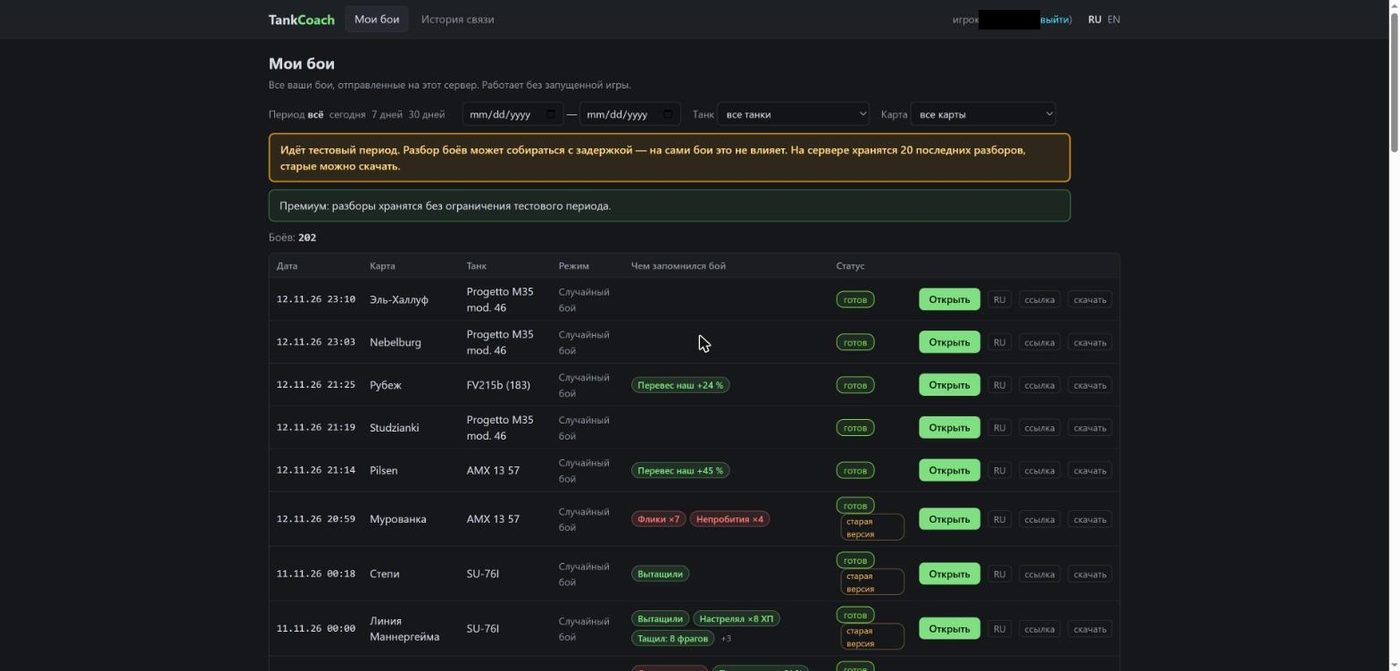
Fig. 1. “My battles”: filters, “what the battle is remembered for” tags, statuses and buttons.
Header. “My battles” · “Connection history” (next section) · on the right the nickname and “log out” · page language RU / EN.
Filters. Period (all / today / 7 days / 30 days or custom dates), tank and map — the lists show the battle count next to each name.
Banners. Yellow — test period: analysis may be delayed, the server keeps the last 20 reports, older ones can be downloaded (battle statistics are kept forever). Green — the account has premium: reports are kept without limit.
Columns. Date · Map · Tank · Mode · What the battle is remembered for · Status · buttons.
“What the battle is remembered for” tags. Up to three most important per battle, the rest under “+N” (hover to see all). Green — good, red — bad, yellow — worth watching. Hover a tag to see its numbers (e.g. “team strength by WN8: ours 1444, theirs 1165”).
| Tag | Colour | When it appears |
|---|---|---|
| Pulled it off | green | win with pre-battle chance below 35 % |
| Threw the lead | red | loss with pre-battle chance above 65 % |
| Dealt ×N HP | green | damage at least 3× your own HP |
| Carried: N frags | green | 3 frags or more |
| Our edge +N % | green | our team stronger by WN8 by 20 % or more |
| Out-balanced −N % | red | our team weaker by WN8 by 20 % or more |
| Lag N % | red | lag in 5 % of battle seconds or more |
| Lag on the shot ×N | red | at least 2 shots with lag right before them |
| Flicks ×N | red | 3+ shots during a swing faster than 15°/s |
| Unaimed ×N | red (yellow for drums and autocannons) | at least 5 unaimed shots and at least a third of all |
| Tanked Nk | green | armour blocked 1000 damage or more |
| Sniper N/N | green | penetrated 90 %+ of 6+ hits |
| Non-pens ×N | red | hit but did not penetrate 4+ times |
| Died at M:SS | red | destroyed in the first 3 minutes |
Artillery is not rated on penetration and aim time. Team strength tags appear only if “Team strength” was computed for the battle.
Statuses. “ready” — the report can be opened; “queued” (with “N ahead” or “next”) and “building” — the server is still working; “failed” — the report did not build (the server retries after a fix); “old version” — built by an earlier builder and lacks new features (only the server can rebuild it; it rebuilds recent battles itself); “report deleted” — removed by the test-period limit, the battle row and statistics remain.
Buttons.
- Open — the report in the game’s language.
- RU / EN — the report in the other language; if it does not exist yet it will be built while the page waits.
- link — copy the report address: anyone can open it, no mod needed.
- download — the report as a single html file that opens offline.
Report views are counted anonymously: time on screen and opened sections, no cookies or IP.
“History”: connection, balance, “What to train” and economy
The second page of the site looks at all battles at once: how your connection changed, what decided a day, and where you lose the most. Six tabs at the top and shared filters: tank, period and source (“TankCoach server” or older battles imported from netprobe 6.x on the PC).
Battles
A connection table for every battle. The line above gives the period totals: battles, median ping, “server silent” share, minutes in battle.
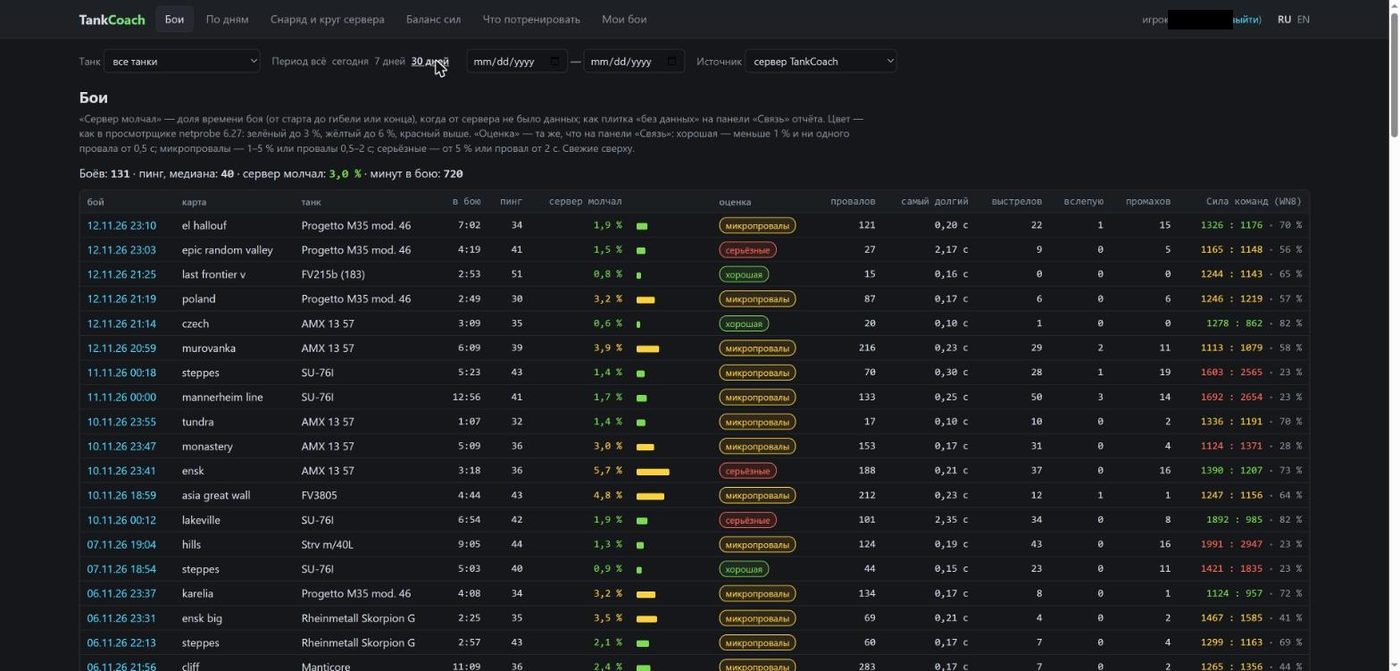
Fig. 2. “Battles” tab.
- Server silent — share of battle time with no data from the server. Green up to 3 %, yellow up to 6 %, red above.
- Rating — “good” (under 1 % and no gap of 0.5 s or more), “micro-gaps” (1–5 % or gaps of 0.5–2 s), “serious” (5 %+ or a gap of 2 s+).
- Gaps / longest — how many connection gaps and the longest one.
- Shots / blind / misses — “blind” is a shot fired while the client was receiving no server data.
- Team strength (WN8) — “allies : enemies · win chance”; green — we were stronger, red — weaker.
By day
The same numbers summed per day — handy when talking to your ISP. The key figure is “server silent” (weighted by battle length), then “seconds with gaps”, the number of battles with each rating (green / yellow / red figure) and the day’s team strength.
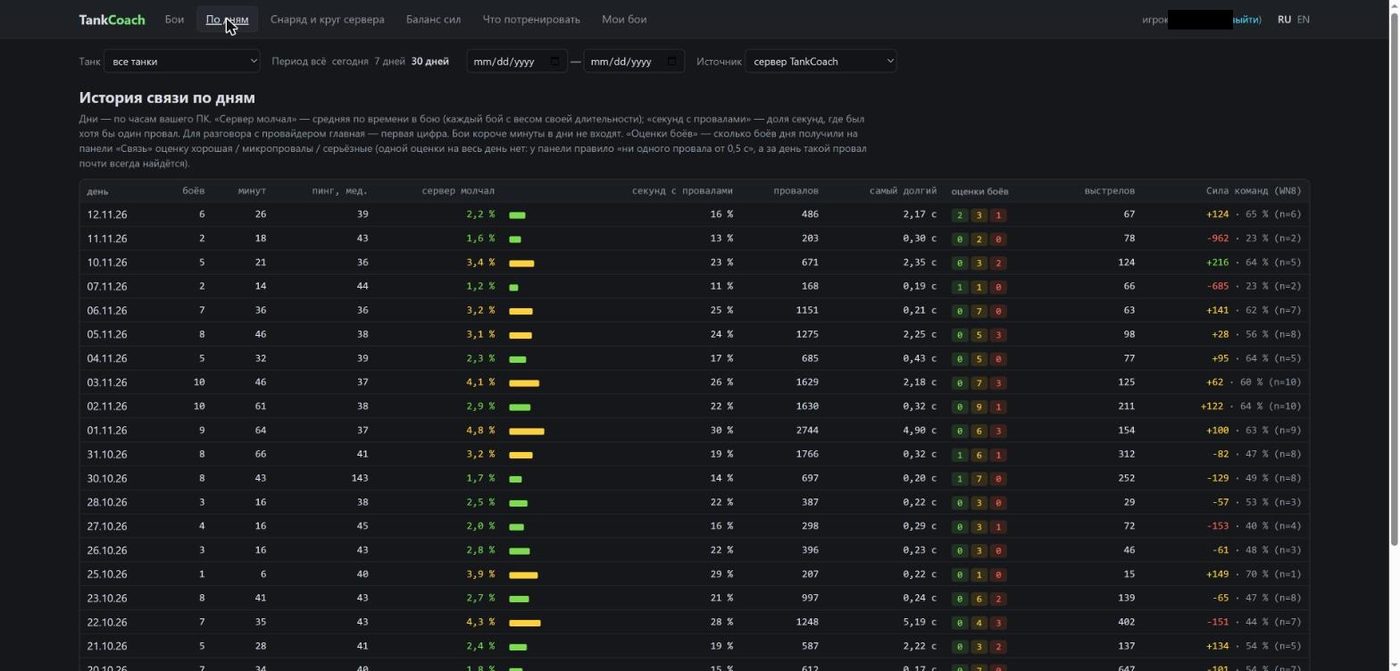
Fig. 3. “By day” tab.
Shell and server circle
A fairness check of dispersion on your own shots: where shells landed relative to the circle the server actually used for the shot. The pink circle is the server circle (1R), dots are shells (green inside, red outside); on the right the distribution of distance from the centre in fractions of the radius; below, the list of shells outside the circle with the reason (lag, delayed confirmation, artillery). In the author’s archive 96 % of 2932 shots landed inside, median 0.34R.
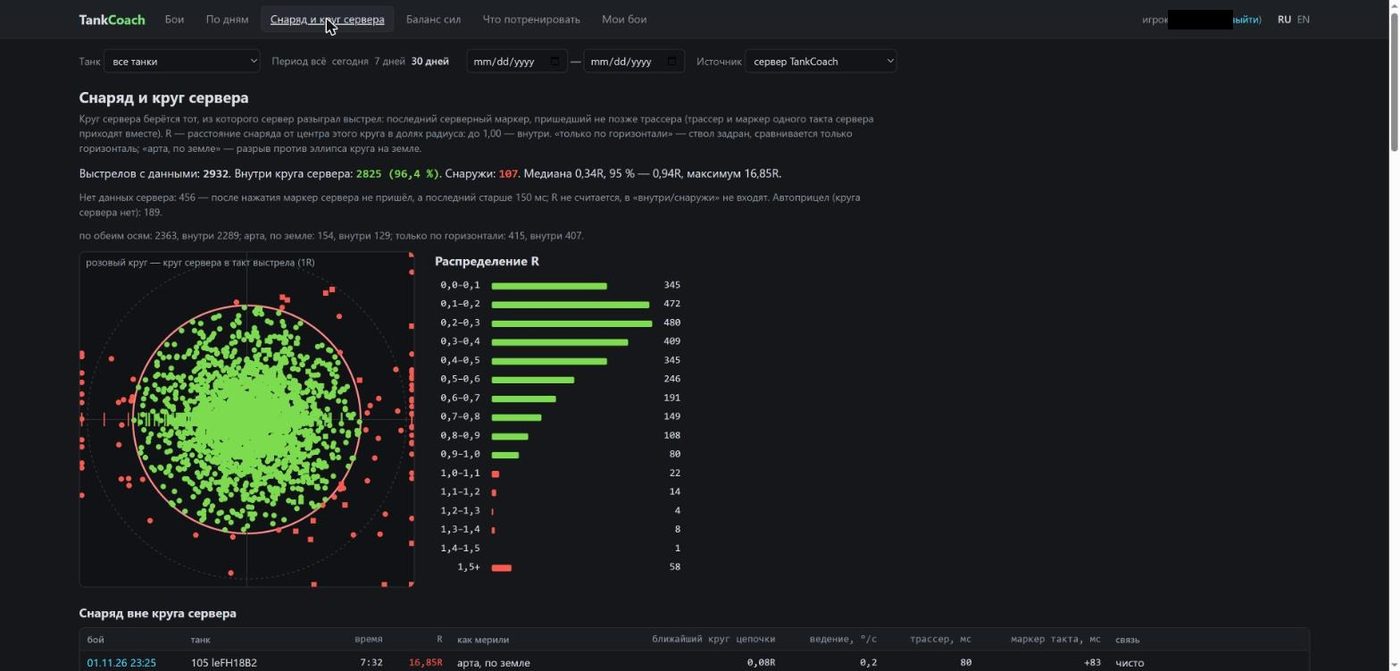
Fig. 4. “Shell and server circle” tab.
Balance: why the day went this way
The answer to “is the game rigging my battles”. Pick a day or the whole period and the page explains what decided the result and splits the deviation of the win rate from expectation into parts (in percentage points):
- team strength by WN8 — which teams the matchmaker gave you;
- my contribution — how you played relative to your own norm on these tanks;
- players’ actions — how allies (without you) played against enemies;
- capture against the odds and battle flow and luck — the remainder.
Below are period cards (how you played, team strength, wins, position in the list, damage · assistance · spotting), a “what the wins were made of” chart, a per-day chart (team strength and your form of the day with confidence whiskers) and a table of days. Battles with bots (fewer than 12 live players per team) are excluded.
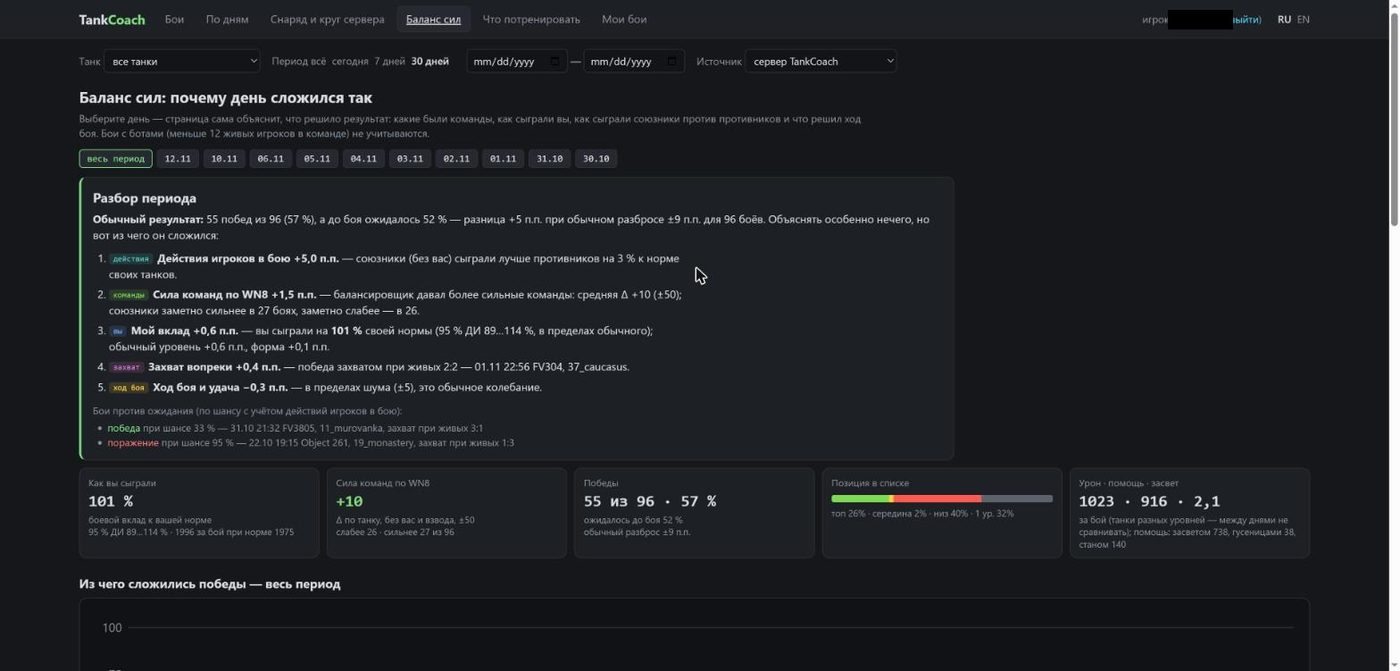
Fig. 5. “Balance”: period breakdown and cards.
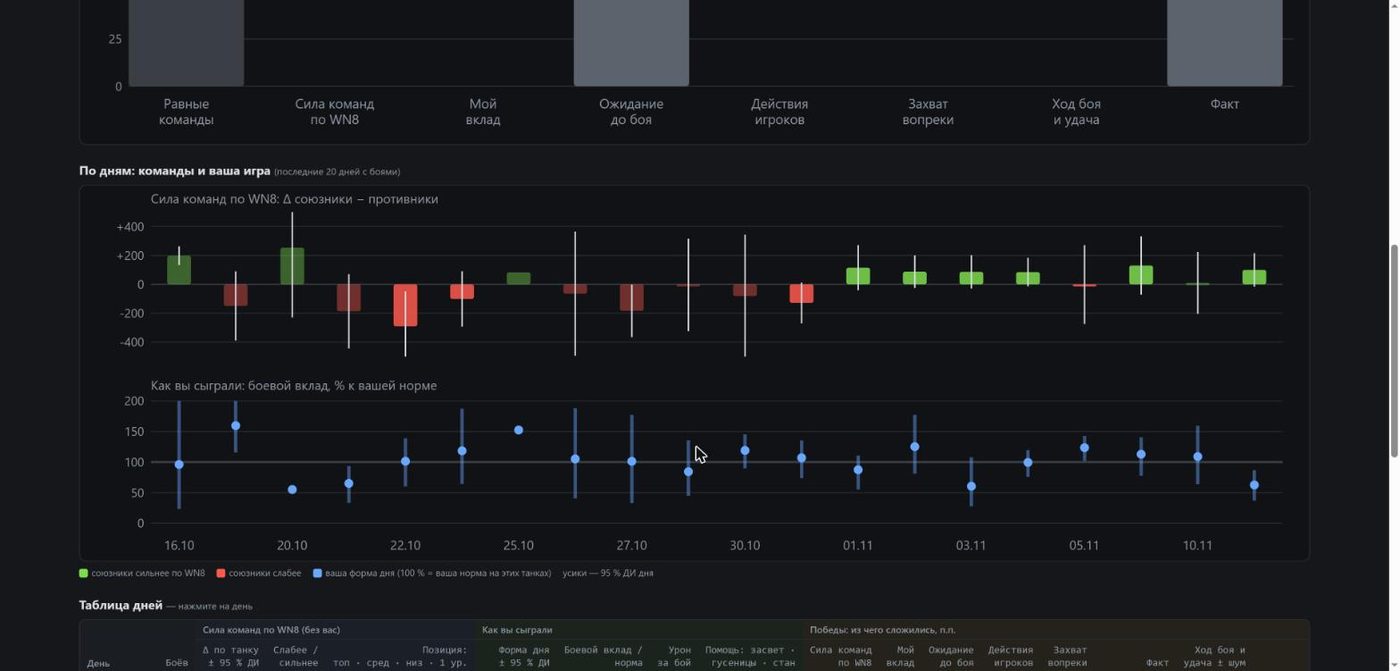
Fig. 6. “Balance”: team strength and form by day.
What to train
The main tab for improving. The chain: measured → found where you lose the most damage → exercise → check in the next battles. You are compared with yourself: the last 50 battles against your whole archive. Lag is subtracted: misses and deaths during bad connection are not counted as your mistakes. Random battles only.
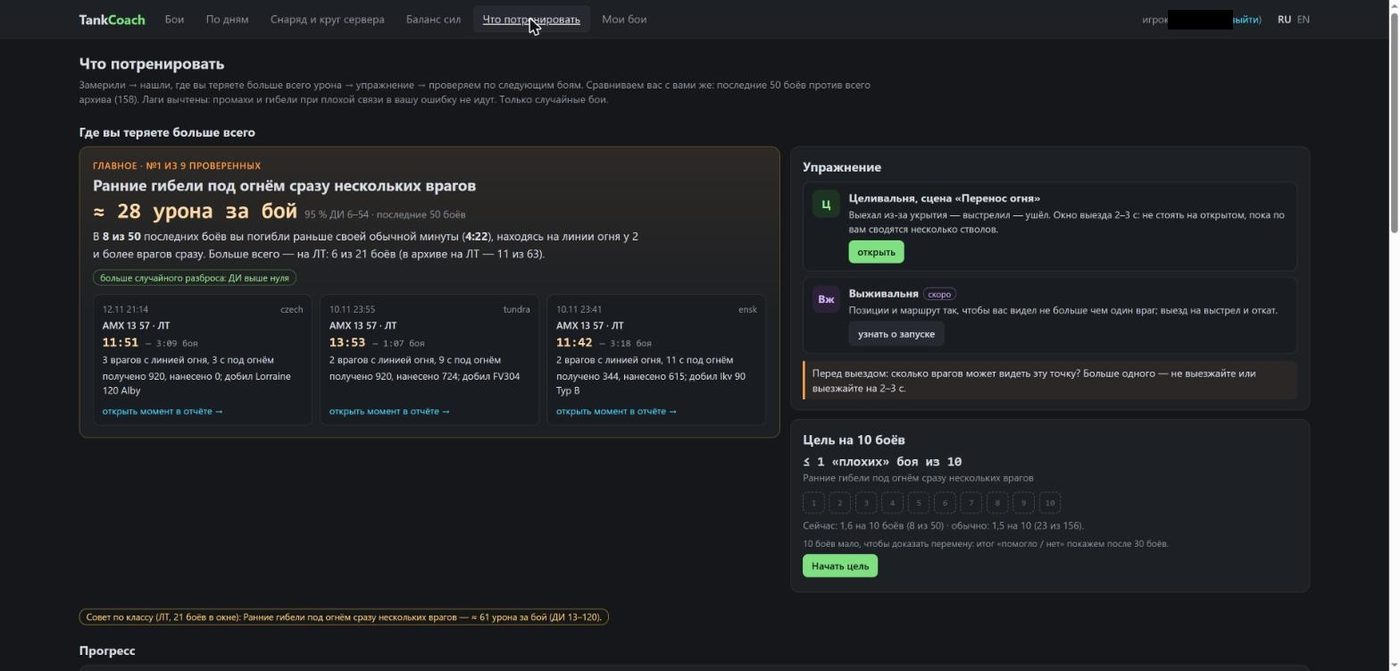
Fig. 7. “What to train”: top leak, exercise and the 10-battle goal.
“Where you lose the most”. The server checks a set of typical mistakes and shows the two most expensive in damage per battle. Each has a cost “≈ N damage per battle” with a 95 % confidence interval (advice is shown only if the whole interval is above zero), an explanation and three examples from your battles with an “open the moment in the report” link.
| What was found | Exercise |
|---|---|
| Early deaths under fire from several enemies | Celivalnya, “Target switching” (peek — shoot — back); Vyzhivalnya (soon) |
| Own aiming misses: off target and no lead | Celivalnya, “Moving target” |
| Shots without full aim | Celivalnya, “As in game” |
| Shell into terrain in front of your tank | “Shot mechanics” (barrel below the line of sight) |
| Shooting where you can’t pen | Celivalnya, “Edge” |
| Side exposed where your front would hold | Tankovalnya (soon), “Angle from the side” duel |
“Goal for 10 battles”. For example “no more than 1 bad battle in 10”: a “Start goal” button, ten cells filled by the next battles. A fair “helped / didn’t” verdict comes after 30 battles. The “Progress” chart shows the share of bad battles over a rolling 20-battle window against your usual level. With 20+ battles of one class in the window, separate “class advice” appears.
“Aiming before the shot”. Per tank (chips with shot counts): the last 30 battles, standing shots at an identified target. A shot is “aimed” if the server circle is at most 1.05× the fully aimed one; “partly aimed” up to 3×; “snap shot” wider. Bars show the hit rate by distance (under 100 m, 100–200, 200–300, 300+ m). If the difference is clear, advice “Aim longer — +N points of hits” appears. For drums and autocannons being unaimed inside a burst is normal, so the first shot of a burst is counted separately with “Aim your first shot” advice. Shots on the move are shown on a separate line; artillery is not rated.
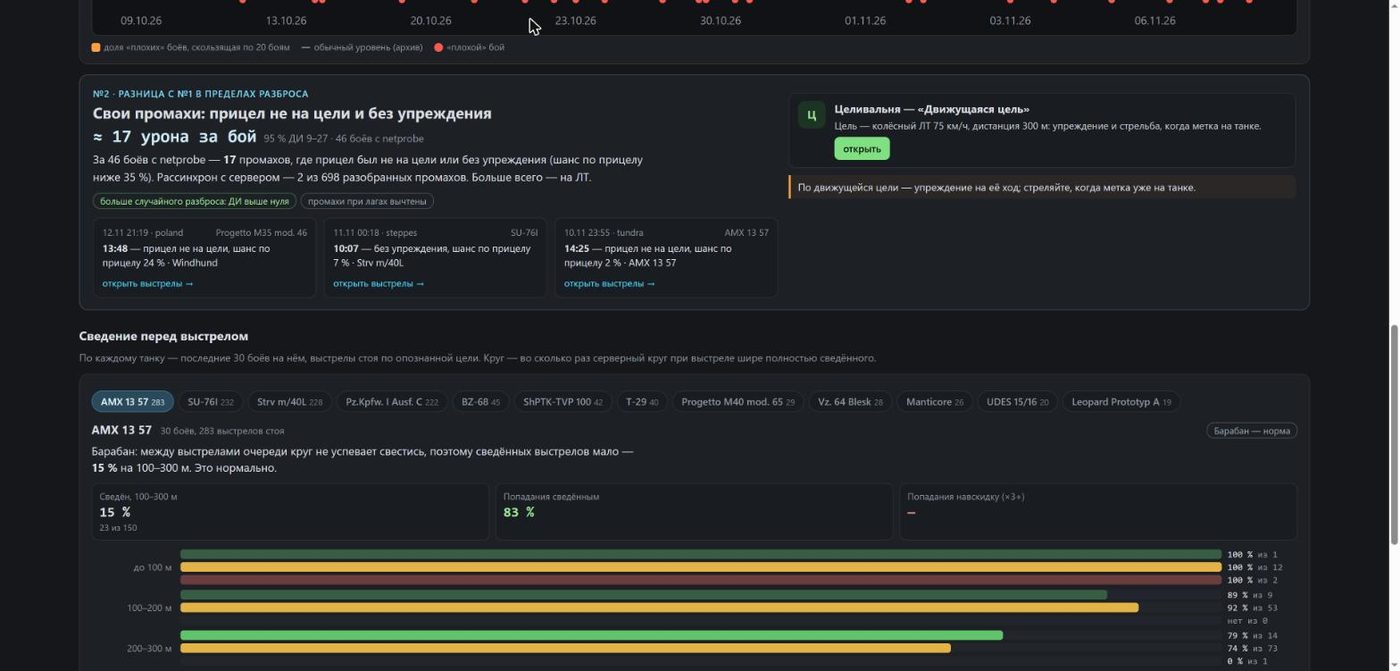
Fig. 8. “Aiming before the shot”: the second leak and the per-tank block.
Collapsed below: “Other leaks” (all checked mistakes with their cost), “Battle indicators by class” and “How it is calculated”. The page does not promise “+N % wins” — it shows where you lose.
Economy: where you earn and where you lose credits
Credits over all your battles — exact sums from each battle’s results, no estimates. At the top, a period breakdown: what you earned net, per battle and per hour, which tank farms best and which loses credits, what you missed without premium, what missions, the pet and reserves gave, where the costs went. Its own filters: tank, battle mode, period.
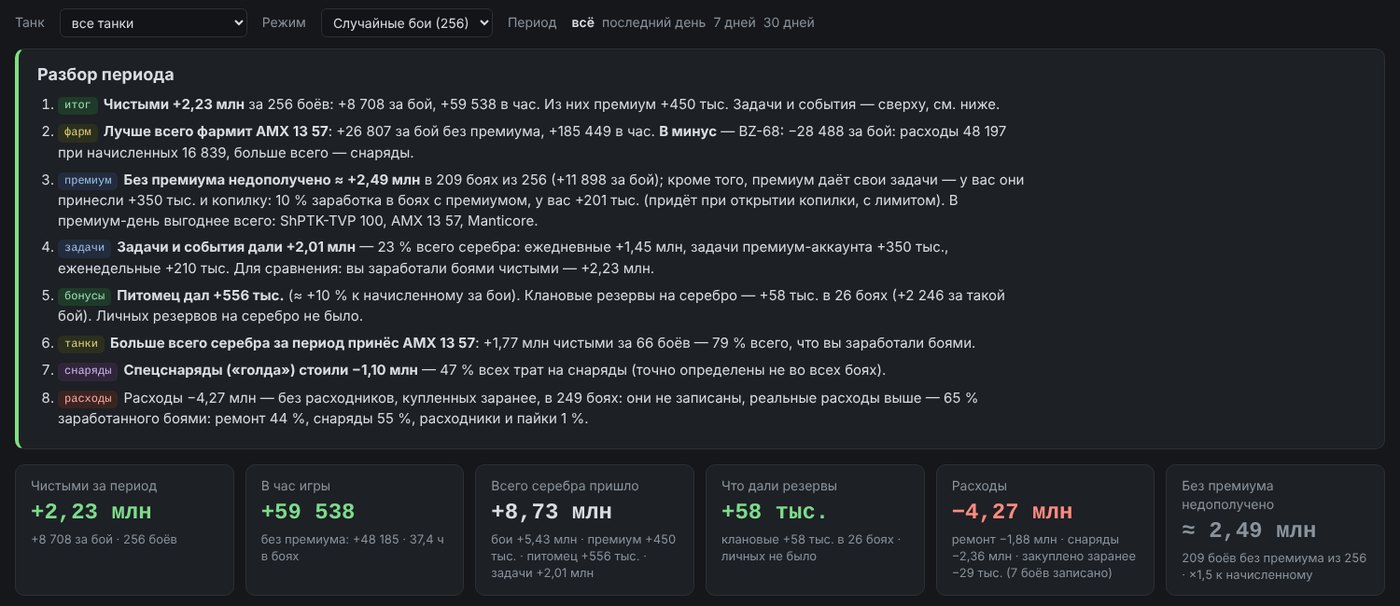
Fig. 9. “Economy”: period breakdown and totals (the screenshots show the Russian version).
- Where credits come from — battle earnings, premium account, pet, clan and personal reserves, daily and weekly missions, premium missions, the premium piggy bank. Missions are shown separately: the battle where a mission was completed credits them, but did not earn them.
- Modes — where farming pays more per hour: random battles, Frontline, Steel Hunter, events; conclusions from 10 battles per mode.
- Credits by day — net without premium, premium on top, and the running total.
- Tanks — earned, repairs, ammo, consumables, farm per battle and per hour, the premium bonus and what the tank brought in over the period. Tanks with fewer than 5 battles are left out of conclusions.
- Premium day — what to play while premium is on: ranked by earnings per hour with premium.
- Consumables and rations bought in advance — they don’t show in battle results, so the mod records in battle which setup was mounted and what was used (from the 2026-11-18 kit); a sale-price purchase can be taken into account.
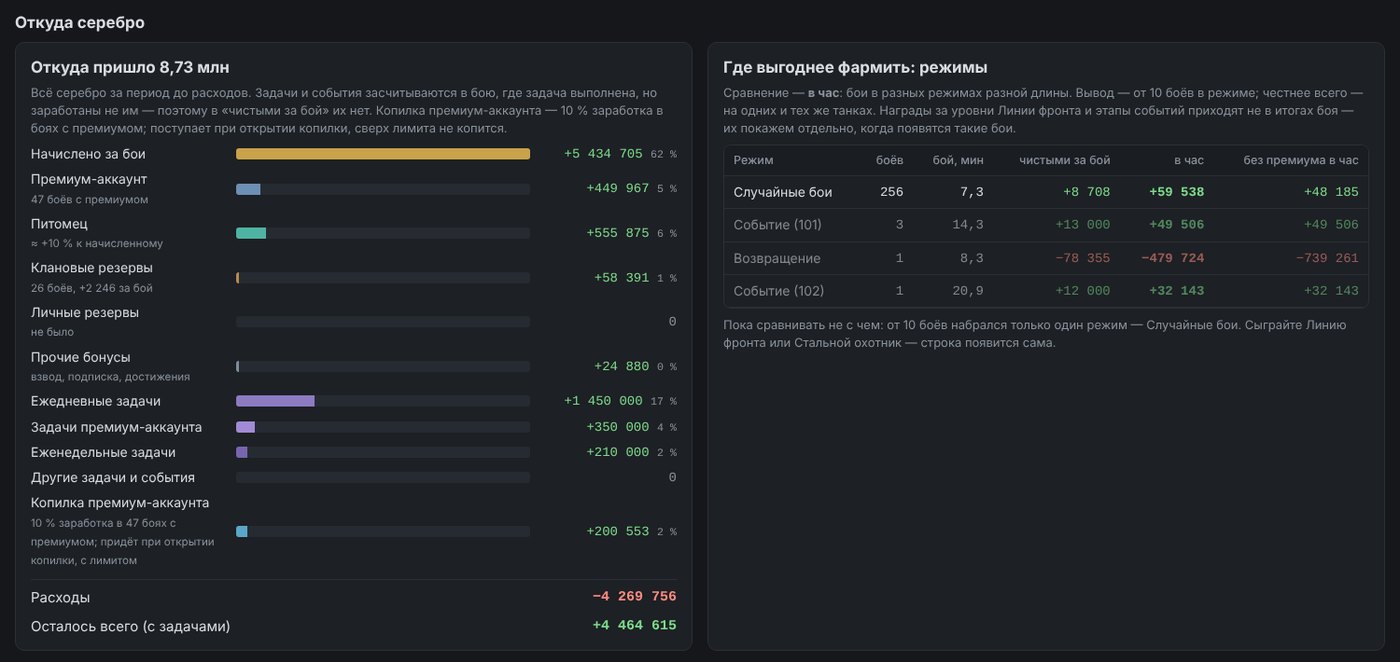
Fig. 10. “Economy”: where credits came from and where farming pays more.
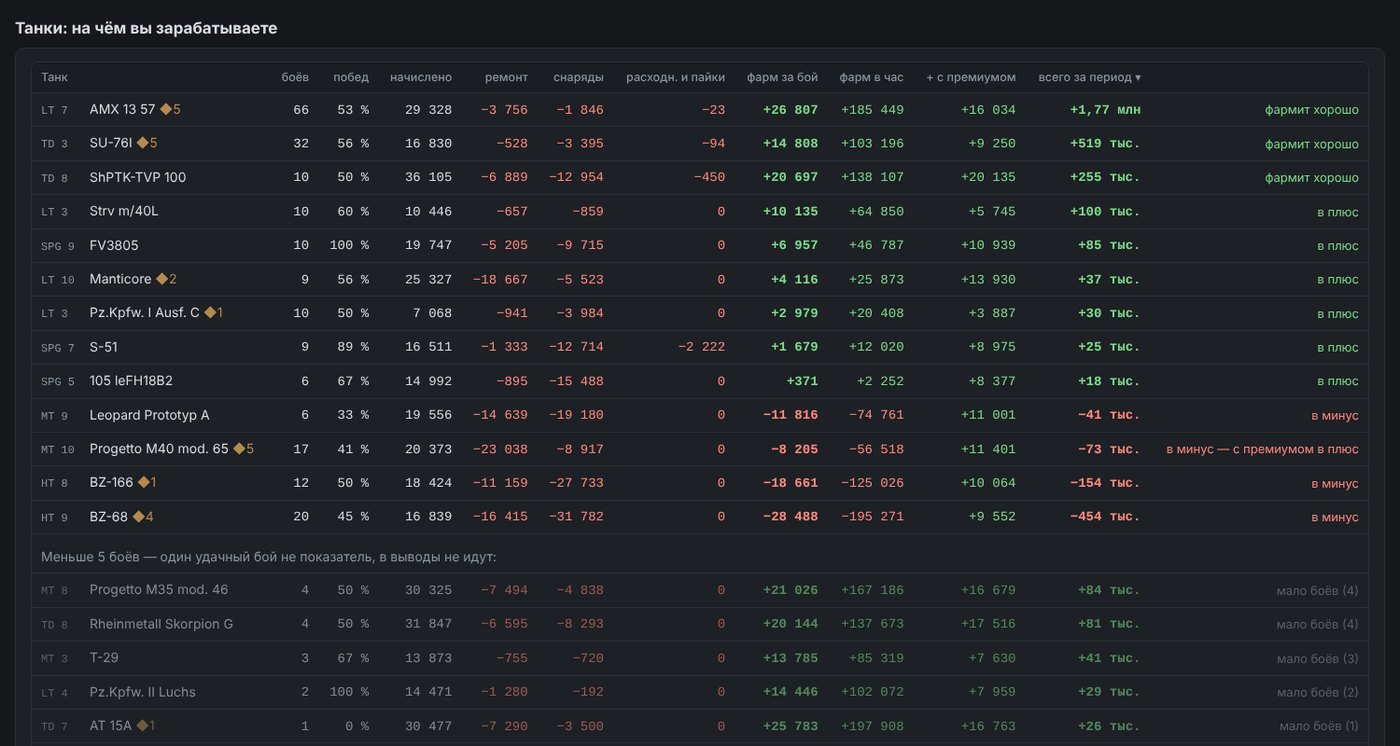
Fig. 11. “Economy”: what you earn on.
The tab on the author’s real battles →
The battle report
A report is one page in the browser (best on a computer). On first open a short four-step tour shows the essentials; bring it back with the ☰ menu → “Show hints”. You can look at examples without your own battle (nicknames replaced): LT, Strv m/40L, MT, T-28, Mir Tankov, SPG, FV3805.
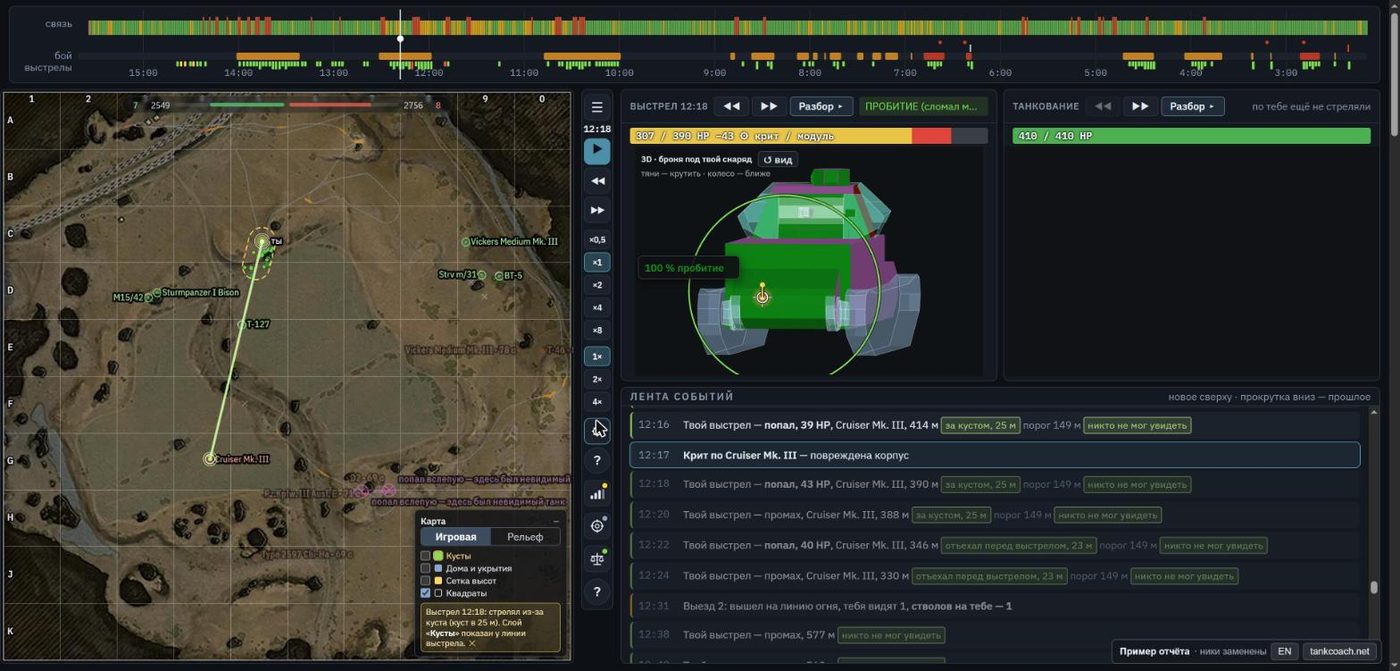
Fig. 12. Report: timeline, map player, shot and tanking panels, event feed.
On screen
- Top timeline — the whole battle over time (the battle timer counts down from 15:00): “connection” row — every second of the battle: green — normal, yellow — ping above usual, red — packet loss. The “battle” strip shows events: orange segments — you peeked onto a line of fire, red — a peek while you were already seen, light blue — armour held, a white mark — death. Red dots above the strip — you were spotted; red sticks above the strip — hits on you (click to select the hit). Below the strip — marks of your shots: the colour is the connection verdict (green — clean, yellow — server confirmation delayed, red — lag before the shot, orange — server reticle outdated, grey — no confirmation), the height shows whether it did damage; click a mark to select the shot. Click the timeline to jump to that moment.
- Map player. All vehicles as your client saw them: allies almost always, enemies while spotted; vehicles lost from view stay as a faint trace where last seen. Tracers of all shots, including from unseen vehicles (dashed, a diamond marks the muzzle); red lines are lines of fire between you and an enemy. Score and HP bars at the top. “Map” panel: game map or relief, layers “Bushes”, “Houses and cover”, “Height grid”, “Squares”.
- Buttons between map and panels (top to bottom): ☰ menu (to the site, English version, other examples, hints) · battle time · play/pause · step back/forward · speed ×0.5…×8 · map zoom 1×/2×/4× · ⚙ layers (camera, traces, names, tracks, sound) · ? help on colours and icons · Connection · Why misses · Team strength · ? battle description. A coloured dot on a button is a quick verdict (e.g. yellow on “Connection” — there were micro-gaps).
- “Shot” panel — your current shot: ←→ step through your shots, the verdict (penetration, non-pen, miss and why), target HP before and after, module crit, and a 3D model of the target with armour for your shell (green — penetrates, yellow — borderline, red — no), the dispersion circle and penetration chance.
- “Tanking” panel — the same for hits on you: where from (even if the shooter was not spotted), which shell, why it penetrated or bounced, what nose-on would have done.
- Event feed — the whole battle in order: shots, hits, crits, spotting, peeks onto a line of fire. Each shot has spotting tags: “behind a bush, 25 m”, “threshold 149 m”, green “nobody could see” — the shot was “free”, red “could spot” — who and from how far. Click a line to move the map and panels to that moment.
Sounds in the report
The player gives the battle sound: shots, hits, the spotting lamp, “Penetration!”, “Ricochet”, “armour held”. Turn it on and off with the sound button next to the map. How the report sounds depends on where you watch it:
- On a computer where the game with the mod is running (you are in the garage) — sounds like in the game. The report finds the mod on that computer, which gives it sounds from the files of your own installed game, while the crew voice and the lamp are played by the game client itself. These sounds are not embedded in the report and are not sent anywhere: they are taken from your own computer while you watch.
- On a phone, another computer, or when the game is closed — our own simplified sounds that the page synthesises itself. Game sounds are protected by copyright, so we do not put them into reports or on the site.
During a battle the report does not touch game sounds: the mod provides them only in the garage.
Shot “Breakdown ▸”
The “Breakdown” button opens the shot in 3D on the real map relief: shell flight, your gun and the target, obstacles; “▶ 2 s before the shot and flight” replays the motion of your reticle and the target. Views: “from the approach line”, “side”, “top”, “from target to you”, “to the burst / obstacle”. Below are the reticle circles (yours, the server one at the click and when the server processed the shot), a “how the shell flew and the target moved” animation, “what happened” in words, gold vs regular ammo, and “move the aim” — what another aim point would have given. For artillery — the dispersion ellipse on the ground and the dead zone.
Lines in the 3D breakdown. The light-green line with dots shows how you moved your reticle during the 2 seconds before the shot (a dot every 0.5 s). It shows at a glance whether you tracked the target smoothly, jumped the reticle around, or were still adjusting when you clicked: a short line with dots bunched together — the reticle sat on the target; a long stretched line — a shot while the reticle was still moving. Below the picture the same in numbers: how many metres the reticle moved and how the aiming circle changed. Next to it — the target’s path (dots every 0.5 s: yellow — the click, red — the impact), the shell arc, the hit point and the target’s armour coloured for your shell. What the mod records around a shot (reticle movement for 3 s before it) the server also uses for advice in “What to train”.
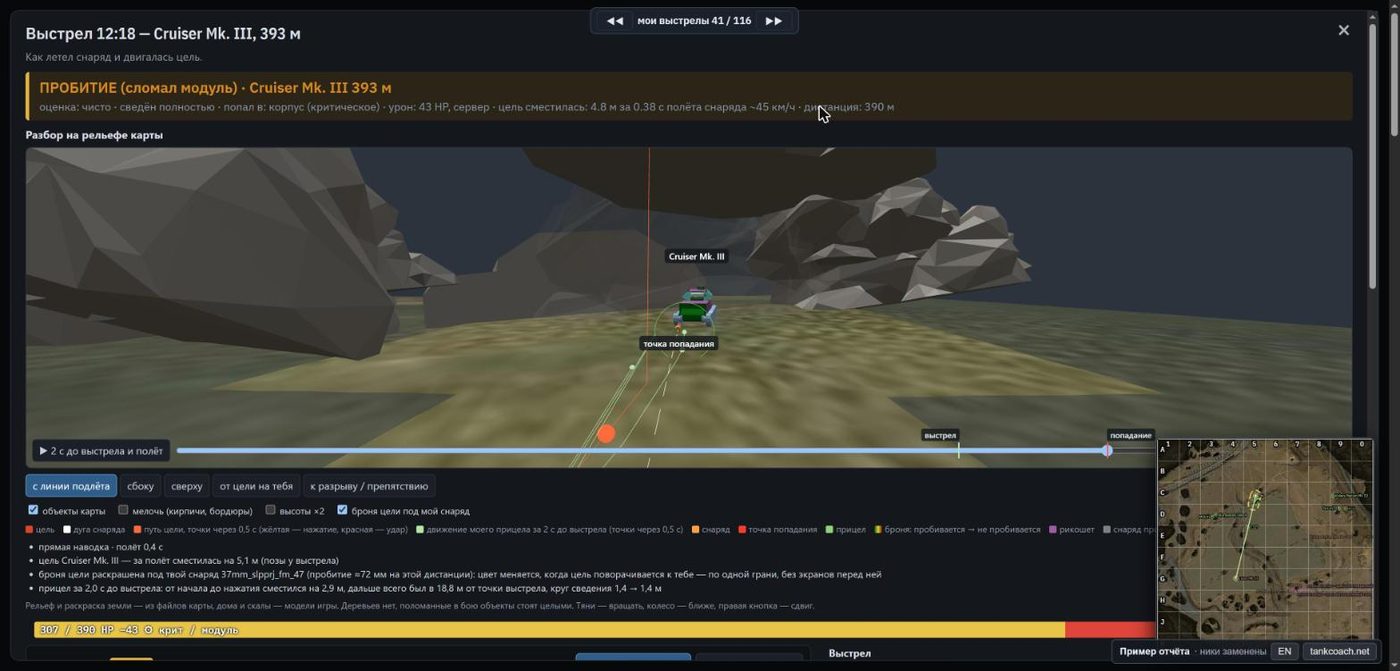
Fig. 13. Shot “Breakdown” on the map relief.
Shot verdicts: flick (fast swing), not aimed, too little or too much lead, over/undershoot, lag before the shot, into cover (bump, rock, house), disputed, and plain dispersion.
Battle summary and the blocks below the map
Battle summary — three numbers (dealt / received, seconds on a line of fire, “cost of 1000 damage” — how much of your HP you gave per 1000 of theirs) and behaviour cards with a figure and an explanation. The stripe colour: red — a mistake, yellow — worth attention, green — good. Cards appear only when there is something to say:
- Delay after the shot; Stayed in place after the shot; Under fire with an empty gun (reloading);
- The shot gave you away before the lamp (the lamp lights with a delay); Visible after being spotted; A barrel was on you, yet the lamp stayed off;
- Shot from a bush / from behind a bush (moving 15 m back would have kept you hidden); Spotted while finishing off (the target died before the shell arrived, but the shot still revealed you);
- Peek lost before the shot (how long they need for your tank vs you for them); Under an aimed barrel; Stood on a line of fire; One against a group;
- Blocked by armour; Who took your HP.
Further down: Team battle (front line and “vehicles left” over time), Battle flow and Peeks in order.
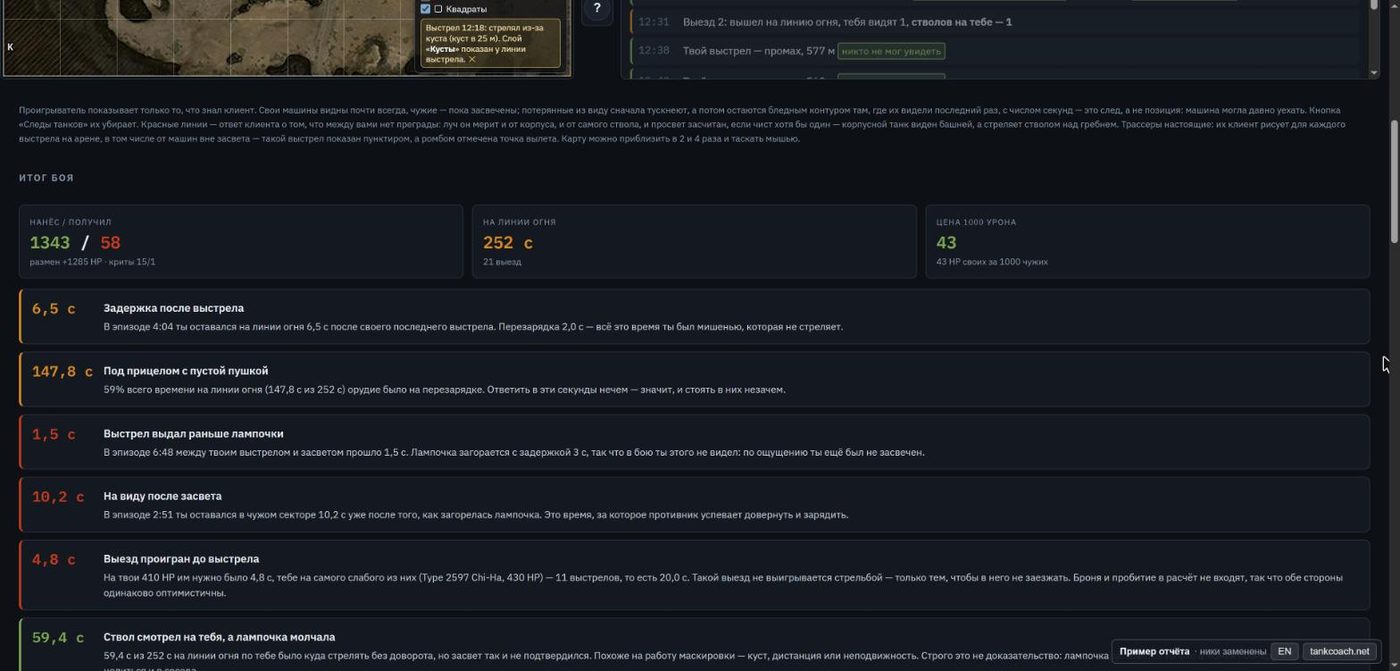
Fig. 14. “Battle summary”: numbers and behaviour cards.
Credits this battle
The coin button to the right of the map. Net for the battle, earned and costs (repairs, ammo, consumables) — exact sums from the battle results; on World of Tanks the earnings are split by our model into taking part, victory, damage, damage on your spotting and spotting. The shot table: every shot, its price and how many credits its damage brought; clicking a row jumps to the shot.
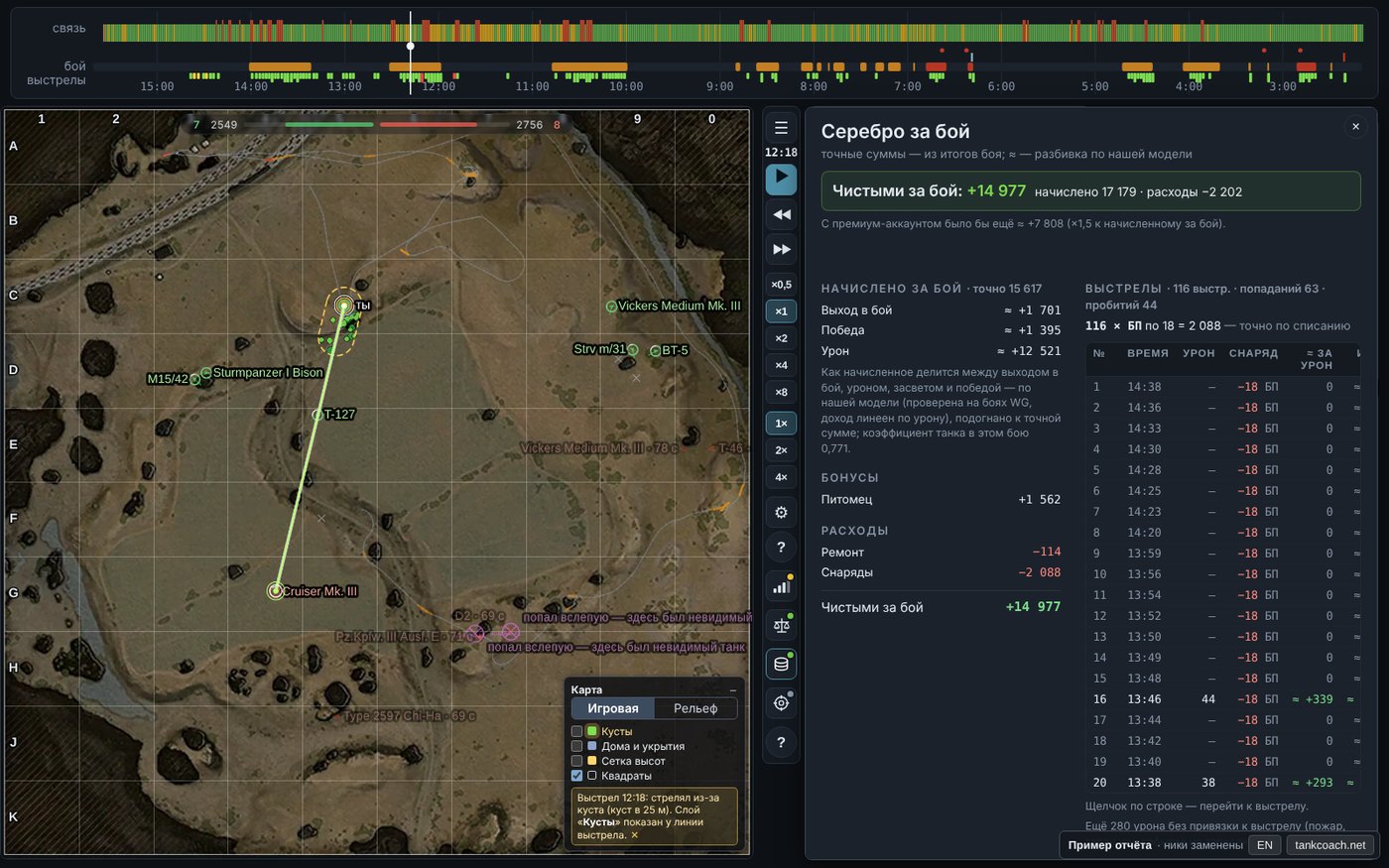
Fig. 15. “Credits this battle” in the report.
“Why misses” and “Connection” panels
Why misses sorts all misses of the battle into groups: own mistake (did not wait for aim, no lead), into cover, desync with the server, dispersion, disputed, no data. Click a line to see the shot diagram and jump to it in the report.
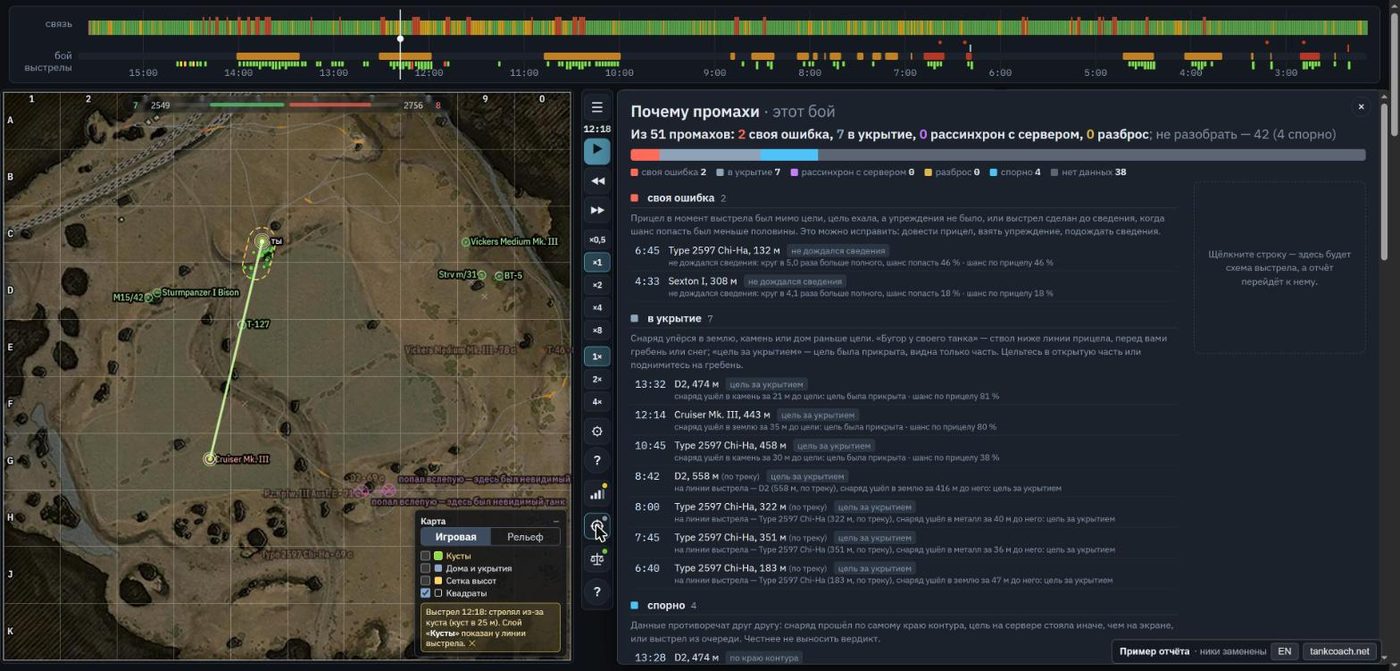
Fig. 16. “Why misses” panel.
Connection in this battle — average and 95th-percentile ping, jitter, seconds with no server data, number and length of gaps, overall rating; “Shooting and connection” — which shots coincided with lag; “Tank control” — how many movement commands (drive, turn) you gave during seconds with no data from the server (“blind”), and whether there were “hull jerks”. A hull jerk is when your tank on screen suddenly snaps back or turns by itself. It happens because your client moves the tank immediately without waiting for the server, while the real position is computed by the server. If lag made them disagree, the server sends its position and the client abruptly moves the tank there. Players call it “the tank got yanked” or “teleported back”: you drove out from behind a rock and the server put you back under fire. The report counts a correction of more than a few degrees beyond what the tank could turn on its own as a jerk, and shows the largest one.
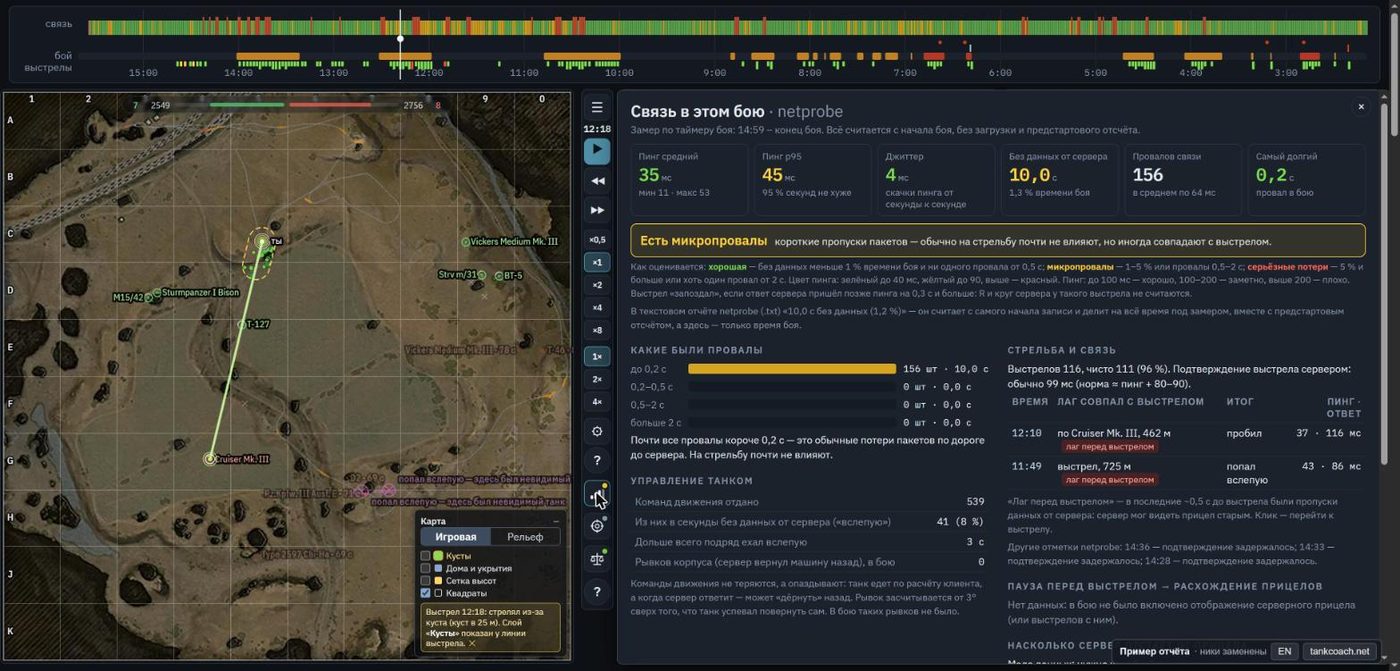
Fig. 17. “Connection” panel.
Team strength: World of Tanks and Mir Tankov
“Team strength” shows how much stronger or weaker your team was by WN8 and what the win chance was before the battle started. On World of Tanks it is complete; on Mir Tankov it is simplified for now.
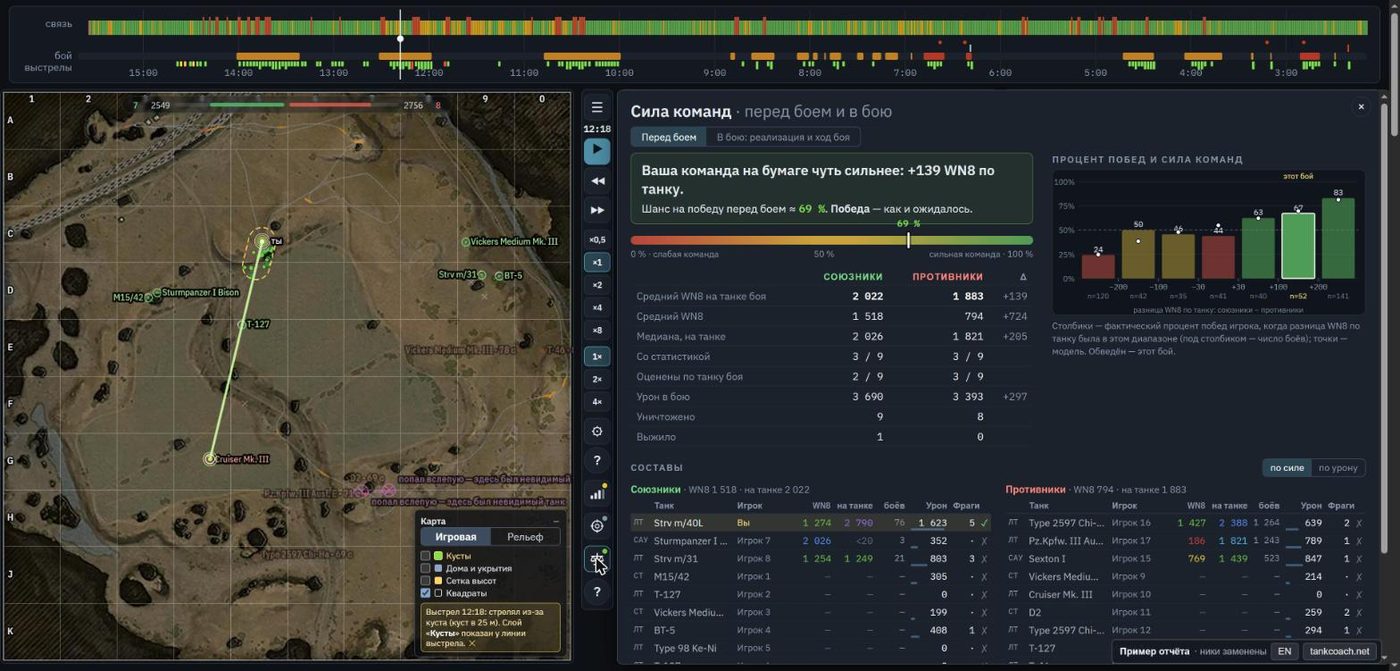
Fig. 18. “Team strength” panel (World of Tanks).
What is in the panel. A one-line verdict (“On paper your team is slightly stronger: +139 WN8 per tank. Chance ≈ 69 %”) and a red-to-green chance bar; an allies / enemies / Δ table (average WN8 on the battle tank, overall WN8, median, players with stats, damage, frags, survived); a “win rate and team strength” chart from your battles (this battle’s bar outlined); “Rosters” — every player with overall and per-tank WN8, battles on the tank, damage and frags (sort “by strength” / “by damage”, the boxed number is the platoon). The second tab “In battle: realisation and flow” shows how players actually performed against expectation.
WN8 colours: red <300 · 300 · orange 450 · yellow 650 · 900 · green 1200 · 1600 · blue 2000 · 2450 · purple 2900+. “?” and “<20” — few battles on the tank, overall WN8 used; “≈” — a new tank, expected values taken from similar tanks.
| World of Tanks | Mir Tankov (since 14.11.2026) | |
|---|---|---|
| Source of player stats | official Wargaming API, queried by the server | public player pages on tanki.su, fetched by the mod and passed to the server (Lesta has not issued an API key yet) |
| WN8 inputs | damage, frags, spotting, base defence, wins — all real | damage, frags, wins — real; spotting and base defence taken as the tank average — WN8 marked “≈” |
| Anonymous players | from battle results | from battle results (the mod queries them in the garage) |
| Older battles | filled in automatically | only battles after installing mod version 2026.11.13 |
| Strength tags and “Balance” | available | will appear as battles accumulate; numbers are approximate |
On Lesta the panel shows a warning about this and “tanki.su” as the source. The server measures how far “≈” is from full WN8 on World of Tanks data, where spotting is known. Once Lesta issues an API key, the server switches to full data automatically.
How to read the chance. It is computed from the “WN8 on the tank” difference; the model is personal (your battles), general (all TankCoach players’ battles) or a default curve. Team strength explains a single battle only partly: the model does not know the map, vehicle roles or the form of the day. The panel explains this under “How the chance is calculated and how much to trust it”.
Browser trainers and how they connect to the analysis
The goal is not only to show a mistake but to let you train it and then honestly check on real battles whether it got better. The trainers run in the browser, free, no install; their models are built on our measurements, and everything simplified is marked in the game itself (“Honest about the model” button).
The training loop:
- Battle analysis finds a mistake that repeats from battle to battle and costs the most damage (“What to train” tab).
- The coach links to the right scene of the right trainer and gives a one-line rule for battle.
- The player sets a “goal for 10 battles” and plays as usual.
- On the next real battles the coach compares the share of bad battles with before; the “helped / didn’t” verdict comes after 30 battles. If it did not help, we revise the “mistake → exercise” link rather than praise the player.
Rules to keep it honest: advice only from many battles (one battle proves nothing); no more than two pieces of advice at a time; the main check is real battles, not trainer scores.
Where the trainer numbers come from. Server reticle delay and the cost of a flick come from our own measurements over thousands of shots. The distribution of shells inside the dispersion circle comes from WotStat statistics over 125 million shots — the most accurate source of shooting data in the game that we know of (half of the shells land within 0.37 of the radius from the centre, fewer and fewer towards the edge).
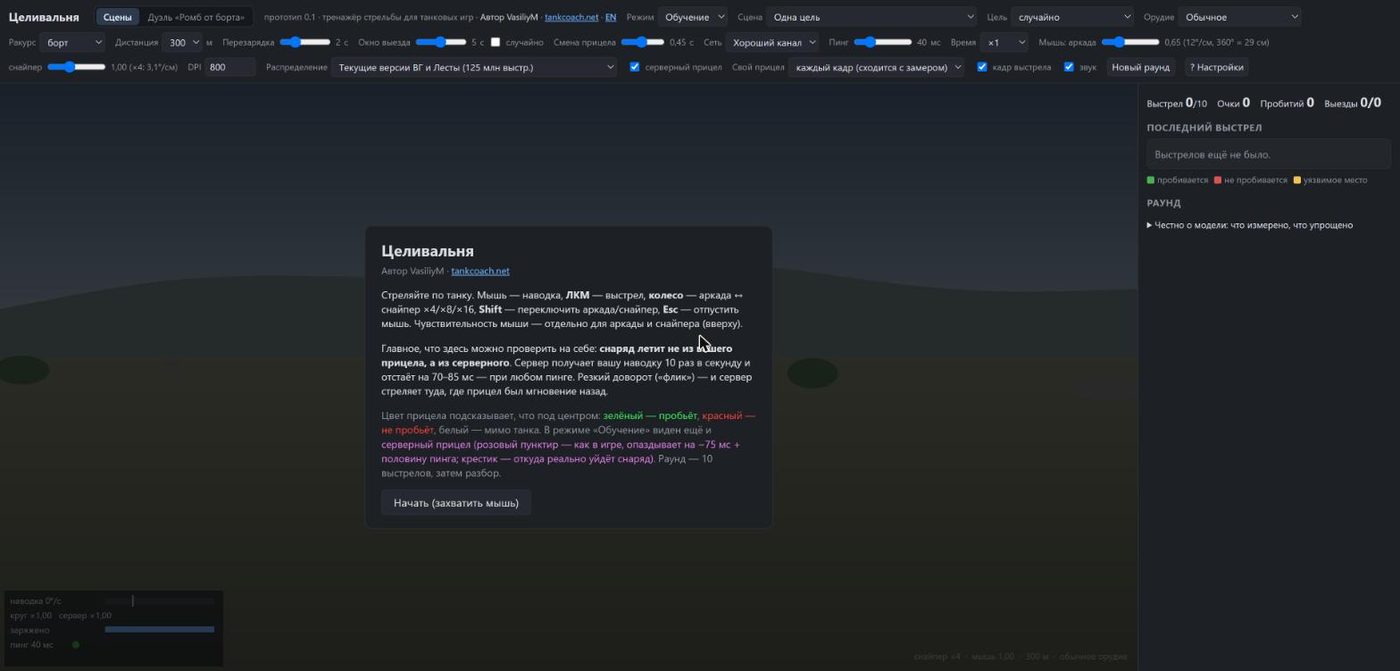
Fig. 19. Celivalnya: scene, network and gun settings; on the right, the shot breakdown.
| Trainer | Status | What it teaches | Which mistake from the analysis it treats |
|---|---|---|---|
| Celivalnya | live (prototype 0.1) | shooting with real mechanics: the shell leaves from the server reticle. Scenes: single target, target switching, moving target, edge (armour angles), blind; “Training” and “As in game” modes; ping, network, gun and distance are adjustable | flicks, unaimed shots, too little lead, non-pens, early deaths when peeking |
| “Angle from the side” duel | live | an angling duel: E 100, Maus, T110E3 and other heavies | side exposed to the enemy, bad hull turns |
| Tankovalnya | in development | watch the enemy barrel and reload, show armour rather than side; peek and pull back on reload | “side to an enemy at your nose”, “hull turn in front of a loaded enemy”, “exposed lower plate”, “nose up after pulling back” |
| Vyzhivalnya | in development | playing LT: route outside enemy view range, shooting from behind bushes and from beyond 445 m, shot and pull back | early deaths under several barrels, “the shot gave you away before the lamp”, “shot from a bush”, “spotted while finishing off” |
| Artillery mode | planned, name not chosen | top view, full aim, leading moving targets given the long flight, target choice | artillery misses on moving targets (the ellipse and target motion are already in the report) |
| Kustovalnya | postponed | camouflage of long-range TDs behind bushes | spotted after firing from a bush closer than 15 m, spotted on the move |
Where we are taking “analysis → trainer”
- Your tank in the trainer. The link from “What to train” will pass your vehicle’s parameters from its spec: dispersion, aim time, view range, camouflage, drum — so you train on what you actually play.
- Your distances and targets. Scene distance and target type taken from where you miss most (e.g. “100–200 m, partly aimed” from the “Aiming before the shot” block).
- Levels by verdict. Each report verdict gets its own level: “flick” → “smooth tracking”, “not aimed” → “wait for aim, peek shooting”, “server silent” → a “bad network” level, “side to an enemy at your nose” → “keep the nose / angle”, “spotted after firing from a bush” → “shoot from 15+ m behind the bush”.
- “Replay this moment”. From a miss or death card in the report straight into a trainer with the same situation: distance, target speed, armour angle, number of barrels on you.
- Skill scores 0–100 for shooting, tanking and camouflage — from the same verdicts, with progress after training.
- Two-way link. Anonymous scene results will show which exercises actually move battle numbers — and which need rework.
What TankCoach does not do, and what’s next
What there is not and will not be:
- in-battle hints, showing enemies or anything the game hides;
- recording players breaking trees and houses;
- the game password or other mods’ tokens;
- ratings and leaderboards — stats sites do that; TankCoach complements them: they show what works for you, we show why;
- other players’ data in the open: it is used only in anonymous summaries, nicknames are not sent from the battle;
- “+N % wins” promises: we show where you lose and honestly check whether training helps.
Test period. Everything is free; features marked “premium” are open to everyone for now. The server keeps the last 20 reports, older ones can be downloaded; battle statistics are kept.
In progress and planned:
- full “Team strength” on Lesta — once Lesta issues an API key;
- marks for Wargaming map “random events” in the report (zone on the map and “died in the event zone”);
- more precise spotting: several bushes on a ray, checking against rays recorded in battle;
- Tankovalnya, Vyzhivalnya and the artillery mode; trainers using your own tank’s parameters;
- skill scores 0–100 and monthly progress.
Project news: Telegram t.me/tankcoach. The project changes almost every week; this description is as of 14.11.2026.
A young project: how to report a bug or suggest an idea
TankCoach is a very young project: the first versions appeared in autumn 2026, and it changes almost every week. It has bugs: a shot verdict may be wrong, a card inaccurate, a report may fail to build. Your messages are what helps us find and fix them.
Where to write:
- The “✉ Report a problem” button in every report. Choose “Problem”, “Idea” or “Other” and write a few words — e.g. “shot #4: I was not turning, but it says flick”. The battle, report version and screen size are attached automatically; no need to find the battle yourself.
- The mod page in the game (Ctrl+Shift+R). From there you can attach mod logs and screenshots — if the problem is in the game itself (lag, a battle was not recorded, the menu does not open).
- Telegram channel t.me/tankcoach — news and discussion.
If the mod or a report crashes, a technical error report is sent to the developer automatically (this can be turned off in the mod settings). We read every message; the best ideas from players have already made it into the report and the plans.